
How to Take AMAZING Self Portraits with Nikon Z Cameras (Step by Step Guide)
📸 Want to take stunning self-portraits but don’t have a photographer? No problem!
Eric Wilson
2/4/20251 min read
My post content

How to Properly Set Up Your Nikon Z camera for Self-Portraits
Setup #1 - Interval Timer
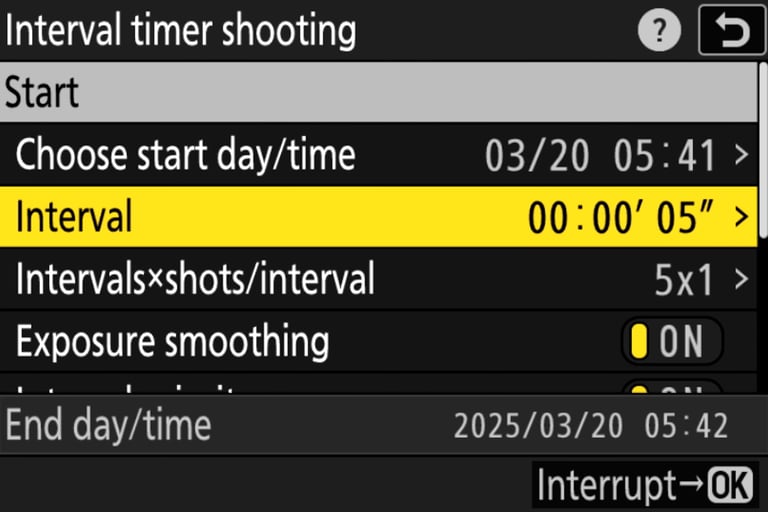
To use Interval Timer on Nikon Z cameras for Self-Portraits, you would navigate to the Photo Shooting Menu and select Interval Timer Shooting. Inside Interval Timer Shooting, you can choose the Start Time, the Interval (the time in between each shot represented in hours, minutes, or seconds.), the Intervals X Shots/Interval (basically how many shots taken between the Interval), and the most important setting "Focus before each shot".
Setup #2 - snapbridge
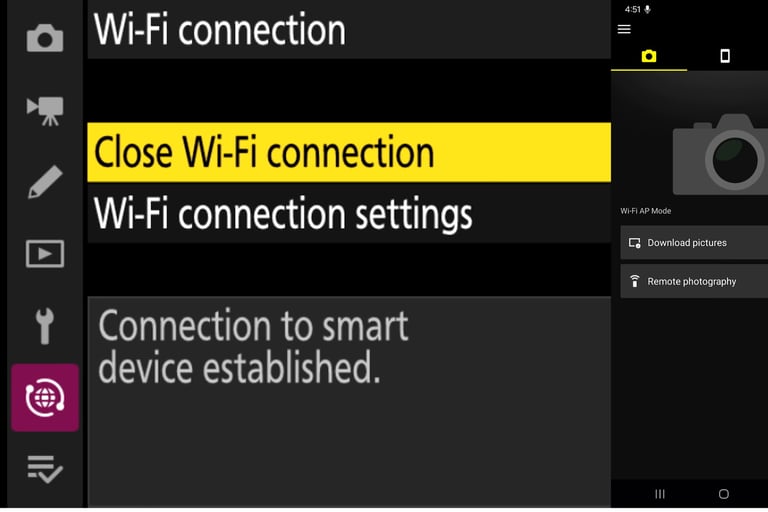
To set up Nikon SnapBridge, install the app, ensure your camera's battery is charged, and enable Bluetooth on your smartphone. Navigate to the "Connect to smart device" option in your camera's setup menu. Follow the on-screen prompts to pair via Bluetooth for automatic image transfers or select Wi-Fi for faster, manual transfers




About Eric Wilson
Hi, I’m Eric, a dedicated professional photographer and videographer based in Bowie, MD. With a strong focus on editorial and family portraits, I thrive on bringing your stories to life through my lens. My passion for visual storytelling extends to creating captivating videos for brands and individuals, whether it’s for marketing initiatives or personal milestones.
Contact
© 2025 All rights reserved.